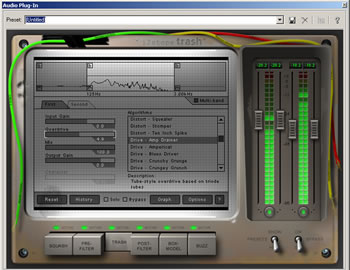
Trash, iZotope's latest 64-bit DirectX plug-in, offers distortion, amp simulation, filter and delay effects for use with guitar, bass, drums, keyboard, or vocals. The developers must have had fun creating this powerful plug-in. In addition to tagging it with a sassy, self-mocking name, they added visual humor to its user interface in the form of a worn appearance that includes taped down wires and fingerprint smudges. But they also obviously put a lot of serious thought and work into designing a versatile effects machine that could produce an endless array of trashy and not-so-trashy sounds.
Like iZotope's popular Ozone mastering software (see our review), Trash is a combination of six modules that can function either individually or together in an inter-related system. The modules can be soloed or selectively bypassed, and the order in which the modules process the audio signal can be changed easily. But, by default, the audio signal is processed through the modules in the order in which they are described here, and that order conveniently outlines how Trash can be used as a module-by-module system for creating trashy effects.
The Main Modules
As its name Squash suggests, the first of the modules is used for taming the audio signal. It has two dynamics sections: a compressor and a noise gate to control peaks, create sustain, or reduce noise. This module, along with two others, includes an important and highly useful multiband feature, which allows you to apply dynamics to each of up to four frequency bands. Controls include band gain, ratio, threshold, attack and release. The controls and the module's three meters (level histogram, gain reduction, and dynamics curve level) are updated to display the currently selected band.
The next module, the Pre-filter, is used for shaping tone before applying distortion to it. You can select each of three filter bands separately, set the filter on each band from a wide selection of 36 types that are modeled after analog filters, and optionally apply LFO (low frequency oscillator) or envelope triggered effects to each filter. Depending on which filter is selected, the frequency range and the options for controlling bandwidth, resonance or gain may be different. One of the most notable benefits of this module's features and their highly variable combinations is the ability to produce amazing LFO or envelope filter sweeps, including classic ones.
After the tone has been shaped, you may want to trash it. For that, the Trash module offers 48 distortion algorithms - such as overdrive, fuzz, or retro - and includes controls for input gain, overdrive, wet and dry signal mix, output gain, and distortion character - an efficient engine for producing a wide variety of distortion effects. For creating more complex sounds, you can chain together two distortions, with independent controls on each, and with the output of the first leading into the second. In addition, like the Squash module, Trash is multiband, allowing you to split the signal into multiple bands (up to four) and to apply a different distortion or chain of distortions to each set of frequencies, or to apply the same distortion with a different setting.
The Post-filter module can shape and improve the tone of the distorted signal by allowing you to control the roll off of the highs and the lows. Like the Pre-filter module, this one also offers the same selection of 36 filter types. But, unlike the Pre-filter, it has only two filter bands, and they are static filters, having no LFO or envelope triggering options. Also unlike the Pre-filter, it is one of the three modules that offers multiband capability. But this feature is useful in post-filtering only when multiband distortion has been applied by the Trash Module. It allows you to filter out any undesired harmonics and frequencies created by distortion within a specified band before it is recombined with the other frequency ranges.
Next, the Box-model provides models of more than 85 amps, cabinets, speakers and other devices (which by their nature also provide post-filtering of distortion, meaning that you might be able to bypass the Post-filter module). Controls include input and output gain through the selected box model, as well as mixing of the modeled and unmodeled signal. You can even select the type of microphone (dynamic, condenser, or ribbon) used to capture the output of the box model, as well as the mic separation and spread on stereo tracks.
The last of the modules, Buzz, is a delay module that offers several types of classic delay effects - tape, tape/tube, analog, digital and lo-fi digital - that are spiked with saturation, degradation, noise, etc., and become more trashed as they fade away. The parameters include a dry and a wet output gain, a spread for stereo tracks, a delay time setting, a delay feedback gain, and a setting for the amount of delay degradation, which varies depending on the delay type. There's even an EQ for adjusting the delayed portion of the signal.
Other Features
Trash offers many other features. Among the more important are:
- Left and right channel input/output level meters, which include several options, such as on and off, peak hold display, tracking the overall loudness or the absolute peak values, etc.
- History and Undo, which keeps track of settings and allows you to compare them.
- DirectX automation, which allows you to automate parameters in host applications which support the feature (such as Cakewalk SONAR, Sonic Foundry Vegas 4 and Sonic Foundry Acid 4).
- Opacity, which enables you to see through the Trash interface to view what's behind it (especially useful in conjunction with DirectX automation).
- Multiple spectrum and level meters.
- CPU Options, which allow you to manage the amount of CPU consumption in specific situations (Trash can be heavy on CPU usage).
- An extensive, context-sensitive, searchable help file, which is activated by clicking on the question mark button in any Trash screen.
- A dedicated Preset Manager, which allows you to add, modify, delete, or share presets across hosts, and also offers dozens of guitar, bass, and drum presets.
Ease Of Use
Unlike Ozone, for which iZotope provided a mastering guide, there is no guide explaining how to use Trash. But, frankly, none is needed. Although it can take a while to explore all of Trash's finer features and to use its controls to best effect, it is not very difficult to figure out how to use it. In part, it's because the design is so well thought out and clear. But, even more importantly, it's because you really can't do anything wrong in terms of trashing sound. It's only a matter of playing around and experimenting to find what you like; and, for that, the wide range of equipment emulation offered in Trash opens up almost unlimited possibilities. This plug-in is as much fun as it is useful (which might explain why the developers got a bit giddy with the name and the interface's appearance).
But iZotope does provide something that's similar to a guide. If you want suggestions or help with setting up a variety of classic or vintage sounds, the iZotope site offers free downloads of "Trash Cookbooks" containing more than 200 presets, along with wave loops and instructions for creating trashy guitar, bass and drum sounds. These "cookbooks" can save you a lot of time and quickly inspire your creativity.
Who Could Ask For More?
In a plug-in that offers so many features and equipment simulations at such a reasonable price, it's difficult to ask for more. Some features we've seen before (in Ozone) and we like them. For example, we like iZotope's system approach to audio software design, which provides an integrated, all-in-one building method for shaping and enriching sounds from beginning to end by means of modules. But we also like the fact that the system design is flexible and allows you to use each module separately or in any order you wish, as if they are a loose collection. We also like the multiband capability found in several modules, which allows the application and layering of effects in selected frequency ranges. And we especially like the capability for creating unusual filter sweeps. In short, we like the infinite variety of rich sounds - distorted and otherwise - that the system and the simulations can create.
So, what else could we ask for? Well, something small and something big. First, something small. Since we've become accustomed to the convenience of using click-and-drag graph handles as controls on the graphic displays of dynamic effects, we would like to see them added to the compressor and the noise gate displays in Trash's Squash module. Next, something big. We think that Trash, in addition to its plug-in design, could be very useful and handy as a standalone design. One advantage would be less CPU demand and less chance of latency without a host, while another would be greater convenience in using it for live sound.
But these are just nice-to-haves. Overall, Trash is one killer effects machine that's incredibly flexible and a pleasure to use. After you try it, you're going to want it.
Downloads
Try Trash for yourself. iZotope offers a downloadable demo that mutes the output for about 1 second every 40 seconds or so. Otherwise, all functionality is enabled.
While you're there, download the free Trash Guides. They contain recipes, presets and samples for drums, keyboards, bass and guitar to help you get the most out of Trash.
Also, download an interesting and fun freebie called Vinyl. It's a DirectX audio plug-in which uses 64-bit processing and advanced filtering, modeling and re-sampling to create authentic "vinyl" simulation, as if the audio is a record being played on a record player. Far from being an average sounding "snap, crackle and pop" simulation, this is the best and most variable one we've ever heard.
System Requirements
- Pentium II 450 or greater
- 64 MB RAM or greater
- Windows 98SE, ME, 2000 or XP
- DirectX host application
Price
Trash is available for purchase as a download or on CD from iZotope. The price is $199 for the download version, or $229 for the CD version (including shipping and handling). The CD contains additional content of more than 100 guitar, bass and drum loops from SmartLoops.com.
Reviewed in May 2003.
Musician's Tech Central
Copyright © 1997-2025
James A. Putnam
All Rights Reserved
|