Mastering - or pre-mastering, to be technically correct - is the finalizing step that comes after you record and mix down a project to a stereo file, but before you place it on the final medium (DAT tape, CD-R, etc.) that will be used to manufacture copies. Of the several purposes of mastering, one is to impose a uniform level of sound on all the recordings in a collection, while another is to refine the overall sound through EQ, compression, stereo imaging, etc. If the recording and mixing have been done well, mastering is the process that can create the professional finish heard in many commercial recordings.
Unfortunately, we've known musicians, both amateur and professional, who've spent hundreds of dollars to have their music mastered by a recording studio, only to end up disappointed with the results. But as music technology rapidly changes and becomes more available for the home studio, musicians are gaining more control over the finalizing process. Nowadays, if you have the patience and determination to learn the art of mastering, you may be able to produce professional sounding masters yourself and for a very reasonable price.
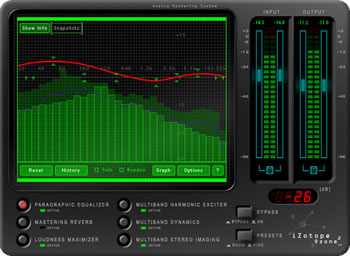
One of the newer products to enter this competitive arena is iZotope's Ozone, a sophisticated 64-bit mastering system in the form of a DirectX plug-in. It's often referred to as a suite of modules, not only because it is structured around six modules - paragraphic equalizer, mastering reverb, loudness maximizer, multiband harmonic exciter, multiband dynamics, and multiband stereo imaging - but because the order in which they process the audio signal can be changed, and because each module can be bypassed or soloed.
However, iZotope calls Ozone a mastering system, with an emphasis on "system." That seems to be a more accurate description. Although the modular structure and many of the functions would allow it to be used for recording or mixing, all of the features collectively, in regard to both processing and purpose, are closely related and oriented towards mastering needs. For example, it provides EQ with spectrum analysis, a four-band compressor/limiter/expander, and studio-quality reverb with control over room size, frequency cutoff and damping. It can also be used with other software to convert digital audio by means of re-sampling and dithering. And, although only one instance of the program can be run at a time, that isn't a drawback. For mastering purposes - as distinct from recording or mixing - you don't need more than that. Also, although Ozone is occasionally heavy on CPU usage, iZotope explains that it is a necessary tradeoff for producing professional quality sound in the mastering process.
iZotope also emphasizes that Ozone is an analog-modeling system, a design feature which emulates the warm and natural sound of analog equipment. In the earlier version, this feature, which is related to the multiband crossovers, was always turned on, but the current version offers the option to have it always running or to turn it on only when the multiband modules are active.
Other Enhancements
There are many other important upgrades in Ozone 2. Among them is a dithering processor (located in the Loudness Maximizer module), which includes: four types of dither noise shaping algorithms; bit reduction to 8, 12, 16 or 24 bits; choice of the dithering number of bits; a nondestructive adaptive DC offset filter for removing DC offset prior to dithering; and DC offset and word length scopes. And, if you need help understanding what dithering is and how it works (who doesn't?), you can download a free dithering manual in PDF format at the site.
Ozone 2 now has a completely integrated and self-contained preset system, which means that it can store, load, update or create presets independently of the host and can even share them across multiple host applications. It comes with over sixty presets, and more will be available at the site.
The multiband modules now have a time-saving menu that lets you copy settings across bands, so that you no longer have to set each band from scratch. You can also insert and remove bands. As iZotope explains, not only do less bands use less CPU power, but solo instruments might sound better with less bands.
The enhanced Multiband Dynamics module (compressor, limiter, expander) allows you to set ratios as high as 30:1, release times from 1 to 5000 milliseconds, and attack times from 0.1 to 1000 milliseconds. In addition to setting individual band level controls, you can set a global level control to change the gain on all four bands in the module at the same time.
The EQ and its spectrum analyzer have major upgrades. The EQ can be set for steeper slopes for the low and high shelf EQ bands, while the spectrum offers up to eight snapshots (four more than previously), which is useful for comparing EQ on various tracks. Also, an options screen allows you to switch between three spectrum-type displays: a linear oscilloscope-type, a one-third octave, or a critical band. Another option offers selections of the spectrum average time, from real-time up to infinite, in order to view the overall tonal shape of a mix.
Although there are still more enhancements, such as the ability to automate over 140 Ozone parameters using DirectX automation in host applications, the selection listed here shows how feature-rich the application is.
The User Interface
Ozone's graphical interface is simple, attractive and clearly laid out. Regardless of how many screen and menu selections each module offers, the degree of complexity in learning how the various functions, buttons, graphs, animated graphics and real-time meters work is moderate. And, in the current upgrade, you can set the interface to be partially transparent, so that you can see through it to your host application. By the way, there are no hardware-imitative knobs in the interface, which means no need for awkward mouse movements for making adjustments.
The Test Run
For the test, we used a 1.8GHz Pentium 4 with 256Mb RAM and WinXP OS. We gave Ozone an initial quick spin on several DirectX hosts - Acid Pro 4, Cakewalk Pro Audio 9 and Cubase VST32 - to check for compatibility. It ran smoothly on all of them. We then used Acid Pro 4 for the rest of the testing.
From the start, we were struck by the excellence and transparency of the sound produced by all of the modules. While the sound quality is undoubtedly due, at least in part, to the 64-bit processing within each module, it's also a credit to the overall design, including the multiband processing and the analog modeling.
The Mastering Reverb, which can be applied to any selected frequency range, is one of the most pleasant, realistic sounding software reverbs we've heard. Used lightly, it softened and sweetened the character of the sound sent through it; used heavily, it could produce dramatic impact. The Loudness Maximizer, which is applied to the entire bandwidth of a mix, is designed to create a louder or fuller master by boosting the overall level of the mix, while limiting the peaks to prevent clipping. Whether set for "soft" or "brickwall" limiting, it produced a very clear and full sound.
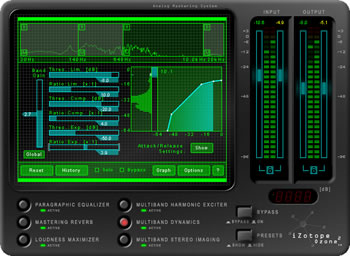
In regard to multiband processing, iZotope explains that Ozone produces a more natural sound by using the same filter design throughout, rather than chaining together individual plug-ins having different filtering characteristics. The Multiband Harmonic Exciter, for which we had only modest expectations, added genuine musical brightness without edge (it's modeled on analog tube saturation). The other multiband effects - the Dynamics module and the Stereo Imaging module - displayed the full advantages of having four bands available for applying the effects. You can, for example, adjust the cutoff of each band to focus on certain frequency ranges in your mix, then mute each band in turn to hear clearly what instruments each band contains. When you decide that an instrument or frequency range needs an effect, you can apply the effect to that band individually, while leaving the other bands untouched. Using that approach, we applied compression to selected drum frequencies in one mix, for example, and produced considerably more punch. The same was true of stereo imaging, where each band has its own stereo widening control - which allows you to positively or negatively widen the band - as well as a delay control for offsetting the delay between left and right channels. By experimenting (as this module requires) and following the suggestions in the mastering manual, we found that we could significantly improve the stereo dimensions of a mix.
We were also struck by the ease of making rapid assessments and adjustments in all the modules. The equalizer, for example, which includes a high and a low shelf filter, plus six parametric bands, offers both graphical and numeric (dB, Hz, music notes) readouts that let you know quickly and exactly what's happening in the spectrum at any moment. The EQ even includes a "6 dB guide" option, a sloped yellow line which acts as a guide for showing a high frequency spectrum that rolls off gradually and is commonly used in commercial recordings to create tonal balance. Likewise, Ozone's ability to copy settings across bands, to make use of the host's DirectX automation, and to load and easily modify presets removes much of the tedium from the mastering process.
Because Ozone is reasonably easy to use and also has the power to change a mix in many ways and very dramatically, we found it tempting to be heavy-handed with it. But, although that might be occasionally useful, a restrained touch usually sounded better, because mastering is normally used only to apply a finishing polish to what is otherwise (hopefully) a well done project. Any serious problems are better worked out in the recording and mixing processes. Moreover, although Ozone is a highly effective mastering tool, it's not a magic wand that can improve sound on its own. In order to use it successfully, you'll need to know mastering techniques or be willing to spend enough time working with Ozone to learn the art and subtleties of mastering. But the learning process is rewarding and enlightening in itself and, fortunately, iZotope provides help. To find detailed information about the modules or any of their functions, or good advice about mastering techniques in general, you can turn to the handy 56-page Mastering Guide, which is available as a free download at the site. (Even if you never try Ozone, you're likely to find this guide very useful.)
When Ozone first came out about a year or so ago, it rapidly earned high respect for outstanding sound, as well as the number and quality of features it offers for a very low price. With the added and improved features in Ozone 2 and the same low price, that reputation can only grow. This is one great product for the home studio.
Downloads
Try Ozone 2 for yourself. iZotope offers a free downloadable demo that mutes the output for about 1 second every 40 seconds or so. Otherwise, all functionality is enabled.
While you're there, take advantage of the free downloadable Mastering and Dithering Guides. They're useful enough to stand alone on their own merits.
Also, pick up an interesting and fun software freebie called Vinyl. It's a DirectX audio plug-in which uses 64-bit processing and advanced filtering, modeling and re-sampling to create authentic "vinyl" simulation, as if the audio was a record being played on a record player. Not just another average sounding "snap, crackle and pop" simulation, this is the best and most variable one we've ever heard.
System Requirements: Pentium II 500 or greater; 64 MB RAM or greater; Windows 98, ME, 2000 or XP (NO support for Windows 95 or NT any longer); DirectX host application.
Price: Ozone 2 may be purchased as a download or on CD from iZotope. The price for the download version is $199 for new customers. The CD, priced at $229, offers additional content, such as a set of 50 audio test files and spectrum snapshots (details provided at the site). For Ozone 1 customers, the upgrade is priced at $49 for the download version.
Reviewed in January 2003.
Musician's Tech Central
Copyright © 1997-2025
James A. Putnam
All Rights Reserved
|